Camera Company
Company
Shop By Category
T&Cs
Shop Online
  • The maker's specifications on every page
  • Free tracked USA-wide delivery over $150
  • 14-day returns

4K Dash Cam with WiFi and GPS | Front dash camera | Car dashboard camera

4K Ultra HD Dash Cam with WiFi and GPS

$239.99 $287.99 Save $48
  • 4K Ultra HD
  • Phone Transfer
  • GPS Logging
  • Low-Light Lens

Price: $239.99 $287.99

  • Free tracked USA-wide delivery on orders $150+, otherwise a flat $20
  • Pay by card or PayPal, handled by the payment provider
  • 14 days to change your mind, plus your statutory rights
Product specifications
Model NameR2-4K
Video Capture Resolution2160p, 1440p, 1080p
Frame Rate30 fps
Field of View150 degrees
Maximum Aperturef1.5
Photo Sensor Size1/2.8 inches
Optical Sensor TechnologyCMOS
Screen Size2.4 inches
Display TypeLCD
ConnectivityWi-Fi
Control MethodApp
Compatible DevicesSmartphone
Mounting TypeWindshield mount
Camera PositionFront
Memory TypemicroSDXC
Maximum Card Size512 GB
Memory Slots1
Video FormatMP4
Special FeaturesBuilt-in GPS, built-in supercapacitor, built-in WiFi, night vision, app control, loop recording, parking monitor, G-sensor, over-the-air firmware update, screen saver, live speed, voice alert
Vehicle TypesBus, car, minivan, truck
ColorBlack
Item Dimensions (D x W x H)2.5 in x 2.56 in x 1.18 in
Item Weight517 g
Included ComponentsCar charger, charging cable, user manual
Number of Items1
Manufacturer Part NumberR2-4K
Weight517 g
Shipping & returns

Tracked delivery anywhere in the USA. It is free on orders of $150 or more, and a flat $20 below that.

If it is not right for you, send it back within 14 days of delivery in resaleable condition and we refund the price you paid, including standard delivery. That is a voluntary policy we offer on top of your legal rights. You cover the cost of returning it unless the item is faulty.

If it arrives faulty, damaged or not as described, we put it right at no cost to you under the consumer protection law of your state and the Federal Trade Commission Act, return postage included.

Shipping details · Refunds and returns

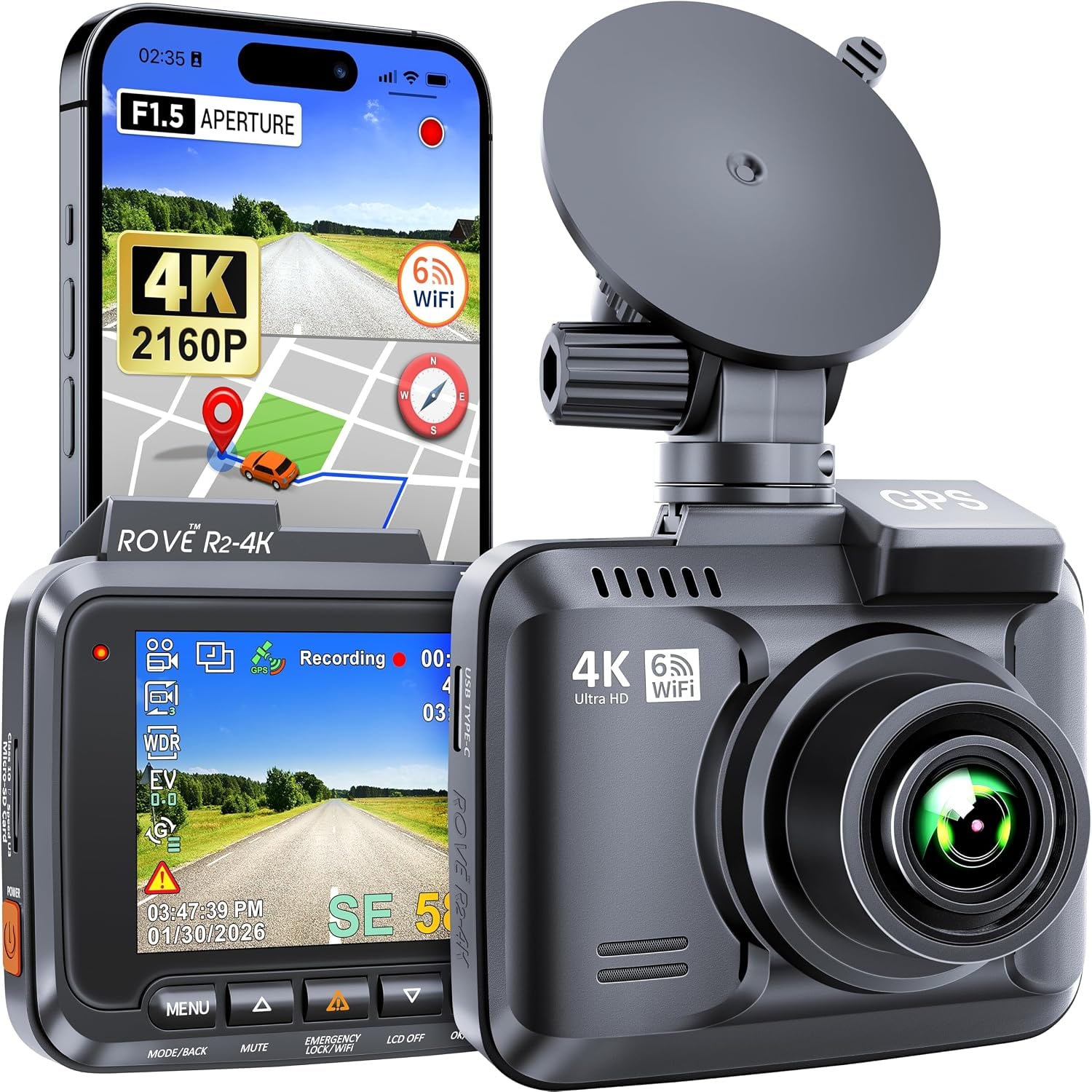
4K Ultra HDRecords up to 2160p at 30 fps for sharper plates and road detail.
Phone TransferBuilt-in WiFi sends clips to the app on your phone without a card reader.
GPS LoggingRecords location and speed alongside your footage for route playback.
Low-Light LensAn f1.5 aperture and CMOS sensor help the camera hold detail after dark.

Drive with a clear record of every mile behind this 4K dash cam with WiFi and GPS watching the road ahead.

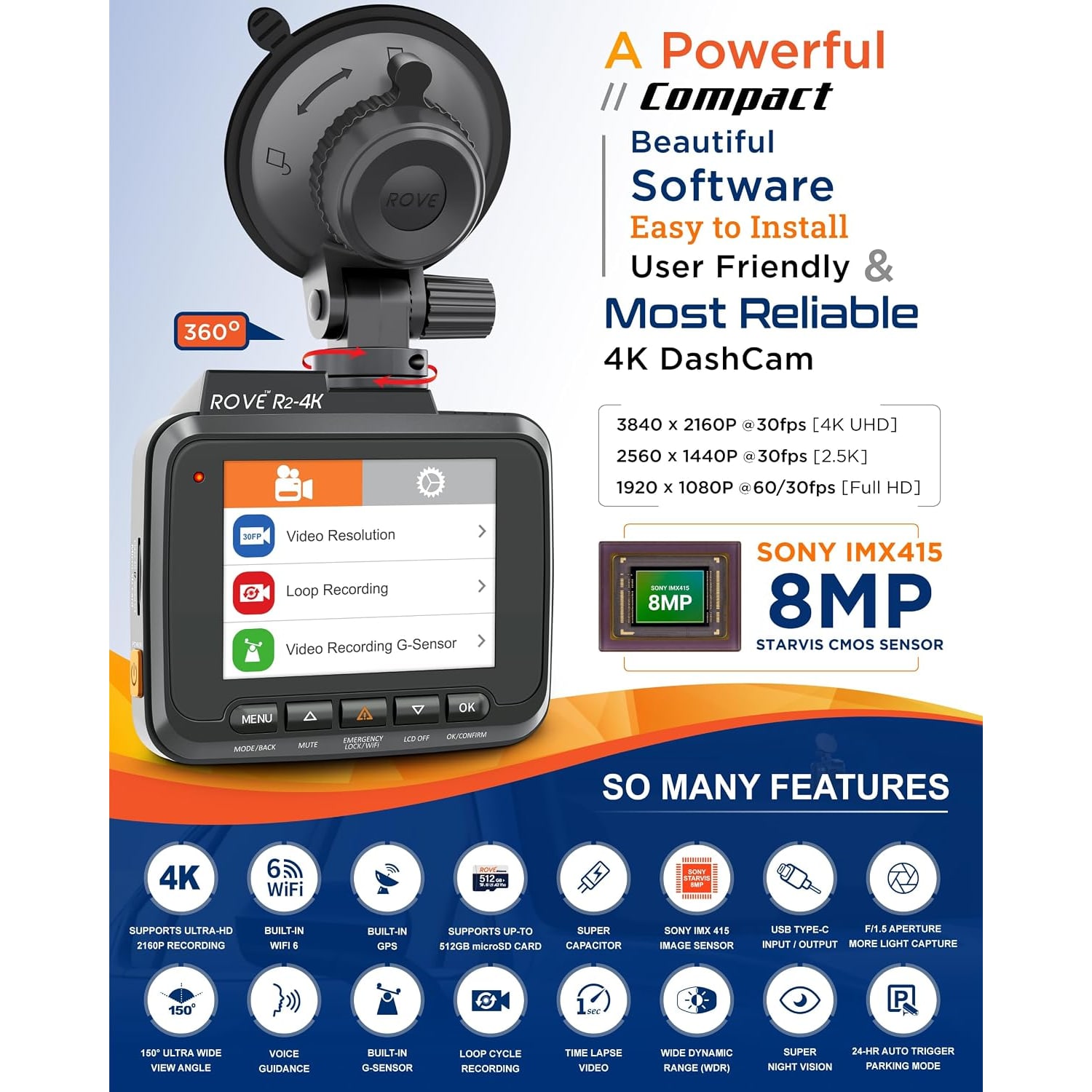
A 150 degree wide lens, f1.5 aperture, built-in GPS logging and phone app transfer let you capture, review and share footage without unplugging a thing.

This 4K dash cam with WiFi and GPS records the road ahead at up to 2160p so license plates and signs stay readable on playback.

A 150 degree field of view covers your lane and the lanes beside it without squeezing the center of the frame.

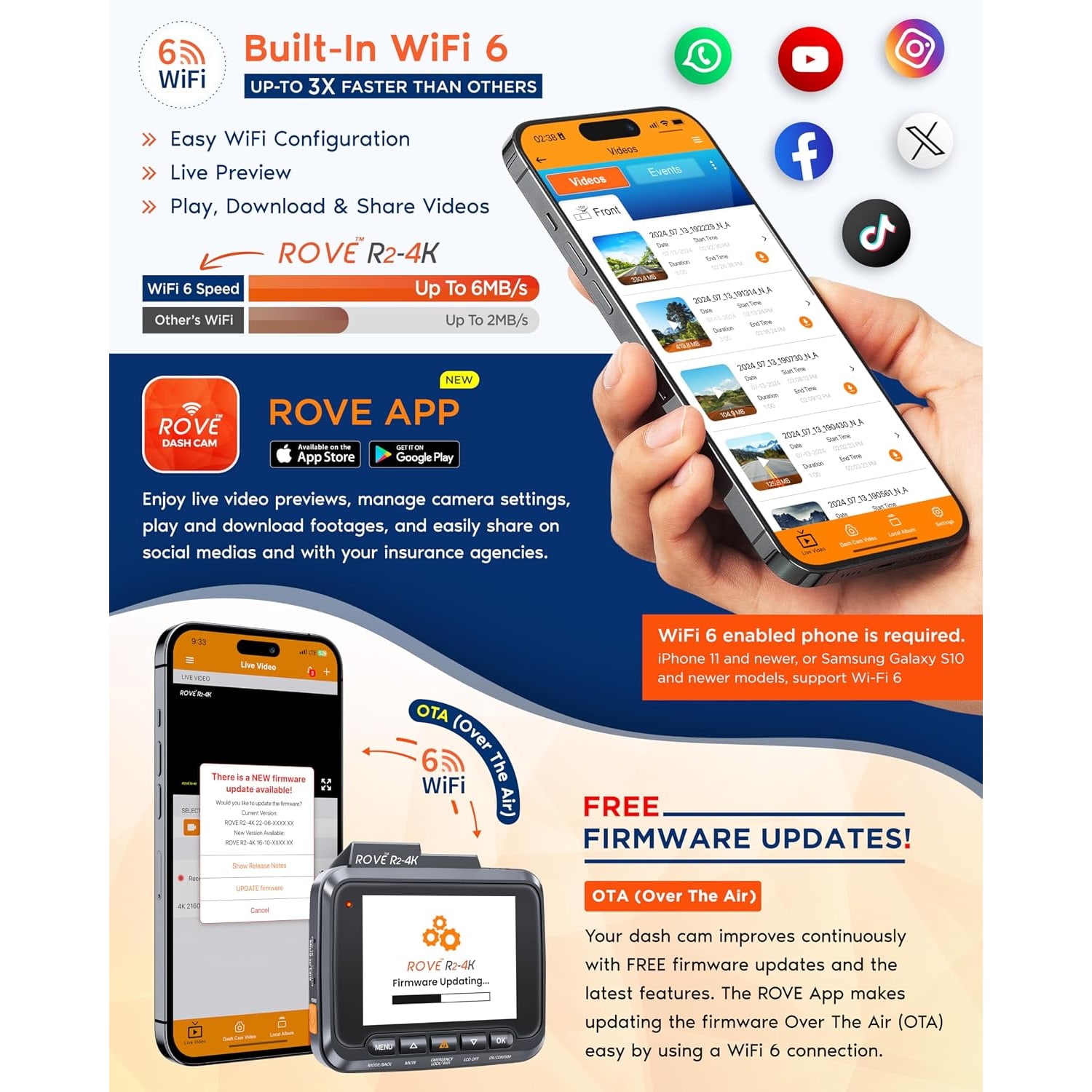
Built-in WiFi lets you pull clips straight onto an iPhone or Android phone through the app, so you can review an incident at the curb.

GPS records your location and speed with the video, which gives any clip useful context later.

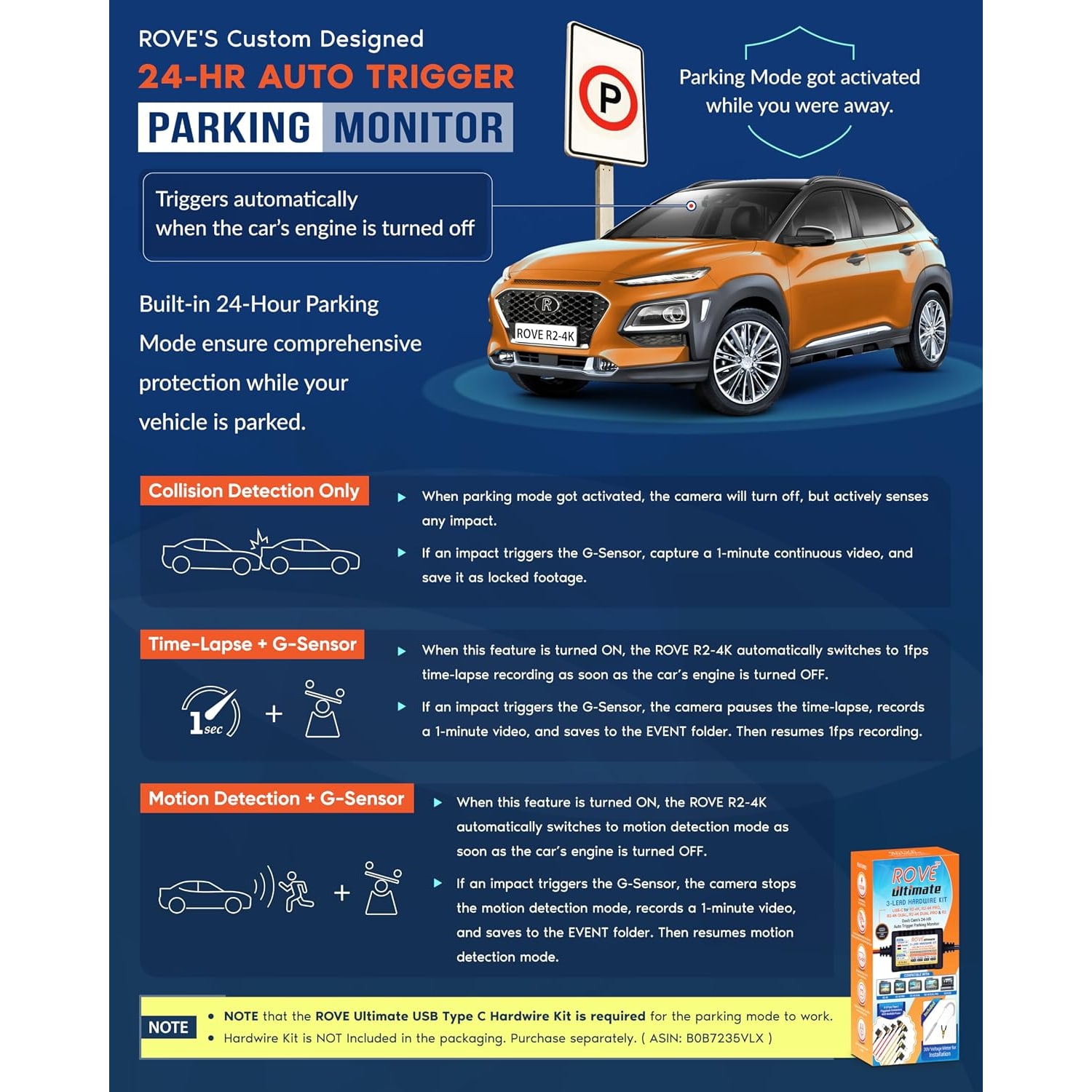
Loop recording, a G-sensor and parking monitor keep the camera working quietly in the background on every drive.

4K Ultra HD Dash Cam with WiFi and GPS

Most drivers never think about a dash cam until the day they need one. Someone changes lanes without looking, a parked car gets clipped, a claim turns into one person's word against another's. This 4K dash cam with WiFi and GPS sits quietly on the windshield and keeps a rolling record of the road ahead, so the question of what actually happened has an answer you can play back.

4K Ultra HD Dash Cam with WiFi and GPS

The camera records up to 2160p Ultra HD at 30 frames per second through a 150 degree lens with an f1.5 maximum aperture and a 1/2.8 inch CMOS sensor. Resolution matters most when you need to read something small at a distance, like a plate on the car in front. The wide aperture matters most at night, when there is less light reaching the sensor and cheaper cameras turn headlights into white smears.

4K Ultra HD Dash Cam with WiFi and GPS

Built-in WiFi connects the camera to the app on an iPhone or Android phone. You can preview what the lens is seeing, browse the clips already on the card, and download the ones you want straight to your phone. That removes the usual routine of pulling the memory card out, finding a reader, and plugging it into a laptop. Firmware updates can also arrive over the air through the app.

4K Ultra HD Dash Cam with WiFi and GPS

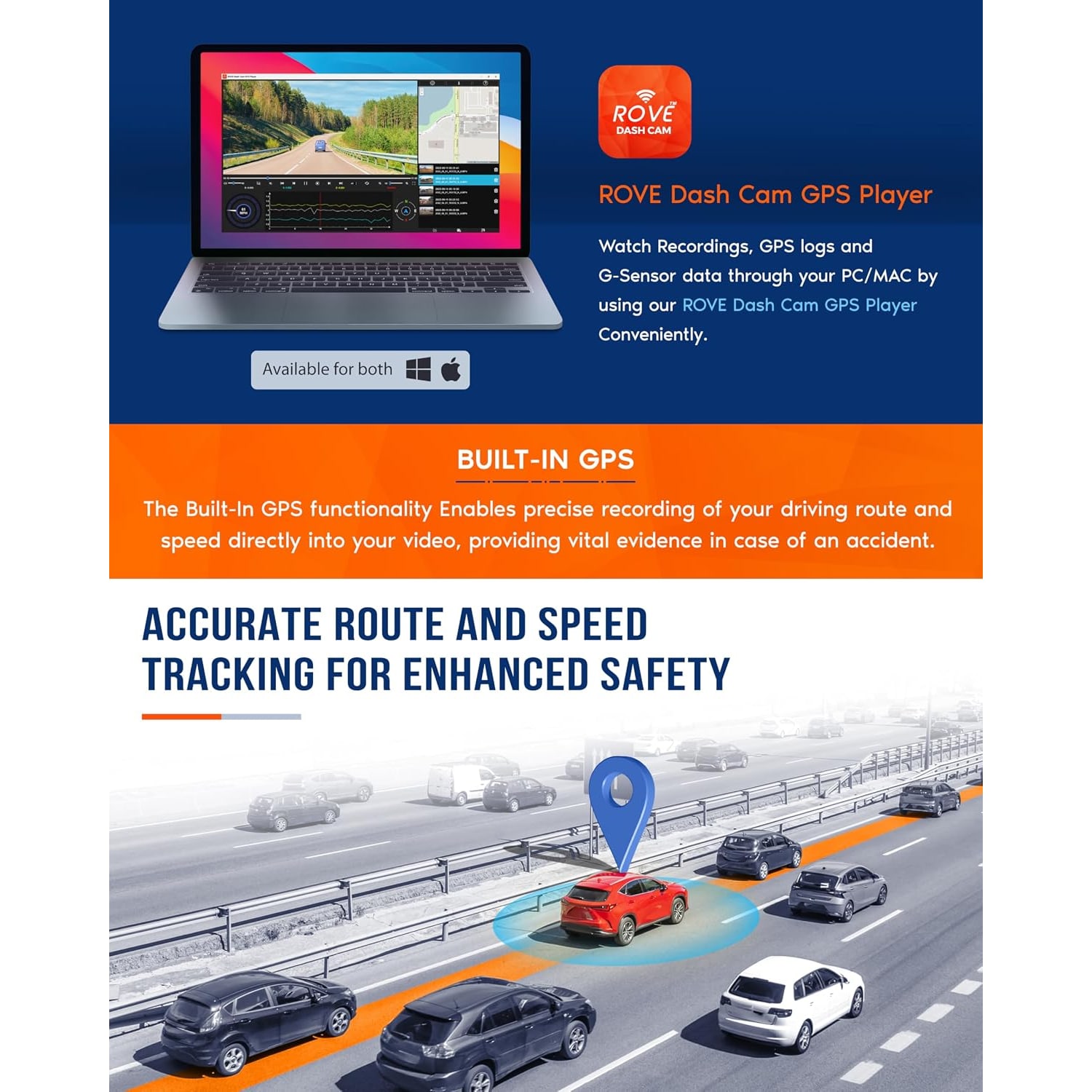
GPS is built in, so each recording carries location and speed data alongside the video. Played back with the companion player, that turns a clip into a trip you can follow on a map. If you drive for work, log mileage, or simply want context on a recording from three weeks ago, the GPS track does the remembering for you.

4K Ultra HD Dash Cam with WiFi and GPS

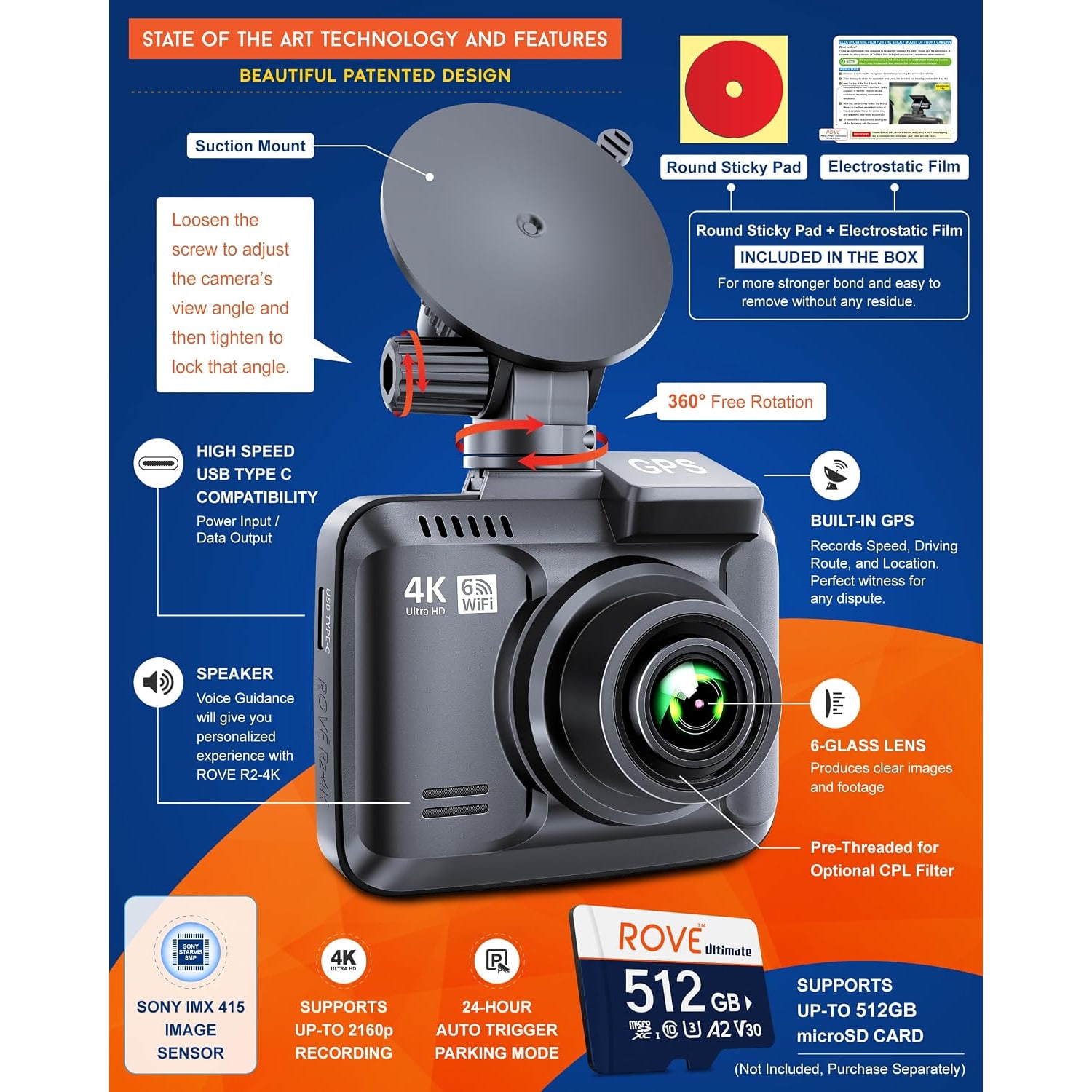
Day to day the camera handles itself. Loop recording writes over the oldest unprotected footage when the card fills, the G-sensor locks a clip if it senses a sudden jolt, and parking monitor keeps watch while the car is stationary. There is a 2.4 inch LCD on the body for setup and quick review, a supercapacitor instead of a conventional battery pack for hot-weather durability, and support for microSDXC cards up to 512 GB. A memory card is not included, so plan on buying one separately.

Not sure yet? That is fine.

A camera has to suit the job you bought it for, and you cannot always judge that from a photograph. If it is not right for you, send it back within 14 days of delivery in resaleable condition and we refund the price you paid, including standard delivery. That is a voluntary policy we offer on top of your legal rights.

If it turns up faulty, damaged or not as described, that is on us. The consumer protection law of your state covers you, and we pay the return postage. Read the full detail on our refunds and returns page, or ask us anything before you order.

Frequently Asked Questions

What does this dash cam actually do?

It mounts to your windshield and continuously records the road ahead while you drive. Footage is saved to a microSD card in short looped files, and the camera overwrites the oldest clips once the card is full. Anything flagged by the G-sensor or locked manually is kept aside.

What resolution does it record at?

It records at up to 2160p, which is 4K Ultra HD, at 30 frames per second. It also supports 1440p and 1080p if you want smaller files or longer recording time on the same card. Most people leave it on the highest setting the card can comfortably handle.

How wide is the field of view?

The lens covers 150 degrees. That is wide enough to take in your own lane plus the lanes either side, which is usually where a problem comes from. It stays narrow enough that the center of the frame is not badly stretched.

Is a memory card included?

No. The maker states that a memory card is not included, so plan on buying one separately. The camera takes a single microSDXC card up to 512 GB. The maker calls for a Class 10 / U3 speed card, which makes sense because looped recording writes constantly.

What size card should I buy?

It depends on how much history you want to keep. A 128 GB card holds a useful amount of 4K footage before looping, and 256 GB or 512 GB gives you more days of recording. Larger cards are worth it if you also run parking mode.

Does it have GPS?

Yes, GPS is built in. It records your location and speed with each clip, so you can follow the route on a map during playback. This is what makes it one of the best dash cam with gps options for drivers who want context on their footage.

How does the WiFi work?

The camera creates its own WiFi connection that your phone joins. Once connected, the app lets you view the live feed, browse saved clips and download the ones you want. It is not using your phone's data plan to do this.

Does it work with iPhone and Android?

Yes. The maker states the app works on both iPhone (iOS) and Android smartphones. The app handles playback, downloads and camera settings, which makes it a practical pick if you want the best dash cam app for iphone or an Android equivalent.

Can I share a clip straight to social media?

Once a clip is on your phone, you can share it like any other video file. The app handles the transfer from the camera, and your phone handles the rest. That is much faster than carrying a card reader around.

What is a supercapacitor and why does it matter?

A supercapacitor stores just enough power to safely close the current file when the car cuts power. It handles heat better than a small lithium battery pack, which is why it is common in cameras that live on a windshield in summer. This model has one built in.

Does it record at night?

Yes. The f1.5 aperture and the 1/2.8 inch CMOS sensor are both aimed at low light, which is what people look for in the best dash cam for night driving. Street lighting and headlights still make a difference to how much detail you get.

What is loop recording?

The camera splits footage into short files and, when the card is full, writes over the oldest unlocked file first. You never have to clear the card manually. Locked clips are skipped, so the footage you care about stays put.

What does the G-sensor do?

It detects sudden motion like hard braking or an impact and automatically locks the current clip so loop recording cannot overwrite it. You can also lock a clip yourself from the camera or app. This is the feature that matters most after a collision.

Does it have parking mode?

Yes, parking mode is one of the stated features, along with motion detection and time-lapse. Parking mode needs continuous power to the camera while the car is off, so check how your car's accessory socket behaves or use a suitable hardwire setup.

Will it drain my car battery in parking mode?

Any camera recording while the car is off draws some power. Most hardwire kits include a low-voltage cutoff that shuts the camera down before the battery gets too low. If you are not sure, run the camera only while driving.

How does it mount?

It is a windshield mount, designed to sit behind or beside the rear-view mirror where it has a clear view and stays out of your sightline. Clean the glass thoroughly before fitting so the mount holds properly. Route the power cable along the headliner and down the pillar trim for a tidy finish.

Will it fit a truck or van?

The maker names buses, cars, minivans and trucks. The body is small, at 2.5 by 2.56 by 1.18 inches, so it tucks neatly into the corner of most windshields. Taller vehicles usually have plenty of room behind the mirror.

Is there a screen on the camera?

Yes, a 2.4 inch LCD. It is handy for lining up the lens during installation and for a quick look at a clip without reaching for your phone. A screen saver option turns it off while you drive so it is not a distraction.

Does it record audio inside the car?

The photos show a mute button on the camera body, so sound recording can be turned off. Recording audio and recording other people is covered by federal and state law, so check the rules that apply where you drive and tell passengers if the microphone is on.

Does it record the rear of the car too?

No. This is a front-facing unit that records the road ahead only. If you want rear coverage as well you would need a separate rear camera or a two-channel system.

How do I get footage off the camera after an incident?

The quickest route is the app. Connect your phone to the camera's WiFi, find the locked clip and download it. You can also take the microSD card out and read it on a computer if you prefer to keep the original file.

What video format does it save?

Files are saved as MP4, which plays on practically any phone, computer or TV without extra software. The GPS track is read by the companion player if you want the map view. For a plain look at the video, MP4 is all you need.

Can I update the firmware?

Yes, over-the-air firmware updates through the app are a stated feature. Updates can add refinements and fix issues, so it is worth checking occasionally. Keep the camera powered while an update runs.

Is it suitable for rideshare or delivery driving?

It is a reasonable fit. The combination of 4K front footage, GPS speed and location logging, and loop recording covers what most drivers want from the best dash cam for uber drivers. Just remember this unit faces forward, not into the cabin.

How do I clean the lens?

Use a dry microfiber cloth, the same kind you would use on glasses. Avoid household sprays and solvents on the glass or the LCD. A smeared lens costs you more detail than a drop in resolution would.

Do I need to format the card?

Yes, format it in the camera when you first fit it and then every few weeks after that. Constant looped writing wears cards down, and regular formatting keeps the file structure clean. If recordings start failing, a fresh card is usually the answer.

What comes in the box?

The stated components are the camera, a car charger, a charging cable and a user manual. A memory card is not included, so order one at the same time if you do not have a spare.

Does it make a good gift?

It works well for a new driver, a family member who commutes a long way, or anyone who drives for work. It is a practical gift rather than a novelty one. Adding a memory card makes it ready to use out of the box.

How long does delivery take?

We deliver to addresses across the United States by tracked delivery. Most orders arrive within 3 to 8 business days of the order date, and Alaska, Hawaii and remote addresses can take a little longer. Delivery is free on orders of $150 or more and a flat $20 under that.

What if it is not right for my car?

Returns are accepted within 14 days of delivery in resaleable condition. Keep the box and the accessories together and get in touch to start the return. If you are unsure whether it will suit your windshield or your setup, message us before you order and we will talk it through.

How to Choose a 4K Dash Cam with WiFi and GPS

6 min read Camera Company

The problem a dash cam quietly solves

Almost nobody buys a dash cam because they want one. They buy one because something happened. A driver drifted across a lane line and then insisted they did not. A parked car came back with a dent and no note. An intersection turned into two conflicting stories with nothing in between.

A camera on the windshield changes the shape of those conversations. Instead of arguing about what happened, you play the clip. That is the whole value. Everything else on the spec sheet is about making sure the clip is actually useful when you need it, which is a different thing from simply having a recording.

Why resolution matters, and where it stops mattering

Plenty of cameras record something. Far fewer record something you can read.

The detail that usually decides an insurance conversation is a license plate, and plates are small, often moving, and frequently lit badly. This camera records up to 2160p, which is 4K, at 30 frames per second. Compared with a 1080p camera pointing at the same scene, you have roughly four times the pixels spread across the frame. A plate two cars ahead has a far better chance of staying legible.

There is a limit, though. Resolution only helps if enough light reaches the sensor in the first place. That is where the f1.5 maximum aperture and the 1/2.8 inch CMOS sensor come in. A wide aperture lets in more light, which means less noise and less smearing when the only illumination is a street lamp and a pair of oncoming headlights. If you mostly drive in the dark, that aperture number is worth as much attention as the resolution number.

Field of view, and why wider is not always better

This lens covers 150 degrees. That is a sensible middle ground.

Very wide lenses, the ones pushing past 170 degrees, catch more of the scene at the edges but stretch and shrink everything in the middle. The car directly in front of you ends up smaller in the frame, and small is exactly what you do not want when you are trying to read a plate. A 150 degree view takes in your lane and the lanes either side, which is where almost every incident comes from, while keeping the center of the image at a usable size.

What WiFi and GPS actually change day to day

These two features sound like extras. In practice they are the difference between a camera you use and a camera you forget about.

WiFi means the camera makes its own connection, your phone joins it, and the app shows you what is on the card. You can watch a clip, download it, and send it to an insurer from the side of the road. The alternative, which is how older cameras worked, involved unclipping the unit, popping the card out, finding a reader and borrowing a laptop. Most people never bothered, which meant footage sat on a card until loop recording ate it.

GPS writes your location and speed into each recording. Played back through the companion player, your route appears on a map alongside the video. If you are logging business mileage, or you need to show how fast you were actually traveling, that data is already there. You do not have to reconstruct it from memory.

Firmware updates also travel over the air through the app, so the camera can pick up refinements without you going near a computer.

Who this suits

Commuters who spend real time on highways get the most obvious benefit, because highway speeds leave the least room for disagreement about who did what. The camera is also a sensible pick for anyone who drives for work, since the GPS log and the 4K front view together cover the usual questions.

Families with a new driver in the house often fit one too. It is not about catching anyone out. It is about having a record if something happens on a road the driver does not know well yet.

The vehicle list covers buses, cars, minivans and trucks, and the body is small at 2.5 by 2.56 by 1.18 inches, so it disappears behind most rear-view mirrors. If you drive a vehicle with a steeply raked windshield, measure the space behind the mirror before you commit to a position.

One thing to be clear about: this is a front-facing camera. There is no rear channel. If you want coverage behind you as well, you are looking at a second camera or a different system.

Choosing a memory card

This matters more than people expect, and the card is not included.

The camera takes a single microSDXC card up to 512 GB. Looped recording means the card is being written to constantly, every minute the engine is running, which is a much harder life than a card in a phone. Standard consumer cards can struggle with that over months. High-endurance cards are built for exactly this job.

On size, think in terms of how much history you want before the loop catches up. A 128 GB card gives most drivers a comfortable buffer at 4K. Step up to 256 GB or 512 GB if you record long days, run parking mode overnight, or simply want to be able to go back a week. Format the card in the camera when you fit it, then again every few weeks.

Power, parking mode and the practical install

The camera ships with a car charger and charging cable, which covers normal driving. Plug it in, the camera starts with the ignition, and it stops when you shut the car off.

Parking monitor is different. It needs power while the car is parked and the engine is off, and a 12V socket that dies with the ignition will not do that. A hardwire kit tapped into the fuse box is the usual answer, and good ones include a voltage cutoff that shuts the camera down before your battery drops too low. If that sounds like more than you want to take on, run the camera while driving only. You still get the coverage that matters most.

For the install itself, clean the glass properly first. Dust under a mount is the main reason cameras fall off in hot weather. Tuck the cable up into the headliner, run it down the A-pillar trim and along the edge of the dash to the socket. Fifteen minutes of care here is the difference between a tidy setup and a cable swinging across your knee.

Living with it

Once it is in, there is very little to do. Loop recording handles storage. The G-sensor locks clips when it feels a jolt. The screen saver turns the 2.4 inch LCD off so it is not glowing at you on a night drive, and voice alerts confirm what the camera is doing without you looking.

Keep the lens clean with a dry microfiber cloth. Skip household sprays on the glass and the screen. Every month or so, open the app, check the camera is still recording and still has the date and time right, and format the card. That is the whole routine.

On audio: the photos show a mute button on the body for turning sound recording off. Recording audio and recording other people is covered by federal and state law, so check what applies where you drive and let passengers know if sound is being recorded.

The short version

If you want a front camera that records clearly enough to be useful, this one covers the important ground. 4K at 30 fps for detail, an f1.5 aperture and a 1/2.8 inch sensor for low light, 150 degrees of coverage, GPS for location and speed, and WiFi so getting a clip onto your phone takes a minute rather than an evening.

Budget for a memory card at the same time, give the install a quarter of an hour, and then mostly forget it is there. That is exactly what a good dash cam should let you do.

Browse the shop

Not sure which card to pair with it?

Tell us how you drive and we will suggest a memory card size that matches your mileage.

Ask us a question

Page summary

This is a front-facing windshield dash cam that records video at up to 2160p (4K) at 30 fps through a 150 degree lens with an f1.5 maximum aperture and a 1/2.8 inch CMOS sensor. It has a 2.4 inch LCD, built-in WiFi with smartphone app control for iPhone and Android, and built-in GPS that logs location and speed. Features include loop recording, a G-sensor, parking monitor, motion detection, time-lapse, voice alerts, screen saver, live speed display and over-the-air firmware updates. Storage is a single microSDXC slot supporting cards up to 512 GB; a memory card is not included. The unit is black, measures 2.5 x 2.56 x 1.18 inches, weighs 517 g, and ships with a car charger, charging cable and user manual. Brand and country of origin are not specified by the maker.